

SAML (single sign-on)
Configures corporate login via an identity provider (SSO). Wrong metadata or certificate locks EVERYONE out, not just one user — test with one account before making SAML mandatory.
The screen
The real screen, in the theme you picked above.
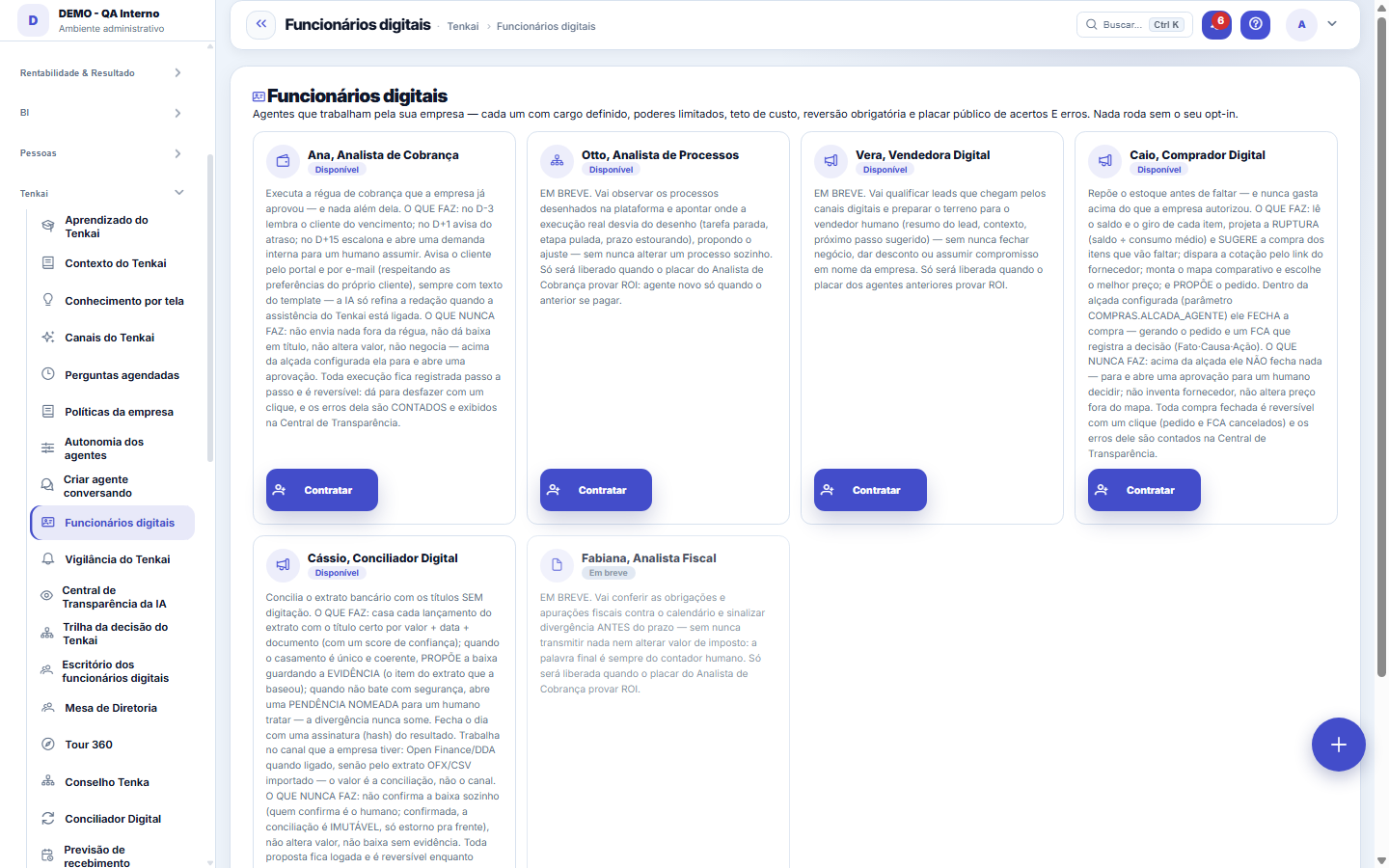
What you find on this screen
A portrait of the screen, read from the screen itself — it changes when the screen changes.
Available actions
SubscribeComing soonRun nowTransparency CenterPauseReactivate
Form fields
NomeComo o funcionário digital é chamado no dia a dia da empresa.
IdentificadorNome curto e fixo do agente, usado quando um registro precisa apontar para ele.
CargoO que este agente faz, descrito como se fosse a vaga que ele ocupa.
SituaçãoSe o agente está contratado, em teste ou desligado.
ContratadoSem este aceite explícito o agente não roda, mesmo estando cadastrado.
AutonomiaAté onde o agente decide sozinho antes de precisar de gente.
Teto por açãoValor máximo que o agente compromete numa ação sem aprovação humana.
Teto de açõesQuantas ações por rodada o agente pode executar antes de parar.
Teto de gasto no mêsQuanto o agente pode custar de IA no mês. Batendo o teto ele para de rodar.
Contratado emQuando o agente entrou em operação nesta empresa.
How to
Rodar agora: ver o funcionário digital trabalhando na hora
The "Run now" button triggers an immediate cycle, without waiting for the daily run. It serves to check in practice what the agent does right after hiring, instead of waiting until the next day. It only appears on hired agents that have their own cycle.
Rules
Por que o Analista de Cobrança não negativa uma pessoa física sozinho
Because registering a restriction at the credit bureau affects someone's life, and the General Data Protection Law guarantees the data subject the right to request review of an automated decision that affects their interests. A review after the restriction has already been published doesn't solve it — by then it has already had an effect, and removing it means lifting, not erasing. That is why the agent stops before: when the debtor is an individual, it opens an approval with the case assembled, and the decision is made by the person your authority-limit policy has chosen. For a legal-entity debtor the flow continues as it always has, because there is no natural-person data subject there. If no authority limit is configured for the approval, nobody is blacklisted — the case simply stays in escalation.
Agente excluído pode ser recuperado
Deleting a digital employee takes it off the queue, the Office and the authority limits — but doesn't erase its history or its configuration: it goes to the trash, from where it comes back with Undo. What it has already executed stays on the Decision Trail and in the Transparency Center, because history isn't erased along with the record.
Frequently asked questions
Does running now bypass any lock?
No. The manual cycle goes through exactly the same gates as the automatic one: the digital employees' opt-in (IA.AGENTE_ATIVO), the powers checked on each tool and the monthly AI cost cap. If the month's cap has already been exceeded, the click returns the block notice and NOTHING is executed. The run enters the scoreboard and the Transparency Center like any other, and remains reversible.
Por que o agente não fez nada quando eu rodei?
Three possible reasons, and the screen says which: (1) the opt-in is off for this company; (2) the monthly cost cap was reached; (3) there simply was no work — no bill at the collection-ladder stage, no entry to reconcile. The third case is the most common and it is an honest result: the agent reports "no action to take now" instead of inventing an action to look useful.
Can the agent run twice on the same day by itself?
No. The automatic run has a daily lock: if the cycle already ran today, it doesn't repeat — not even when the system is restarted in the middle of the day. "Run now" is your request and so it stays free.
Why can’t I hire the Night planner?
Because the company’s plan does not include the dyehouse and knitting scheduling module, which is where it works. Ask the account administrator to add the module to the plan (or buy it separately) and hire again. Agents that do not depend on a module remain available.
Was this article helpful?
In the same module: Digital employees23
Sprint developerAnchor screen of the detail dictionary (allocated devs). Does not appear in the menu.Workflow transitionAnchor screen of the detail dictionary. Does not appear in the menu.Caixa de entrada dos funcionários digitaisO que os agentes estão esperando de você, reunido num lugar só e separado por urgência.Accountant's cockpitThe accountant's dashboard: what's pending, what's due, and what needs approval, per company in the portfolio…My hiresThe marketplace transactions with the flow open: the ones I hired (I am the buyer) and the ones that hired me…Proprietary credit scoreThe credit risk of each drawee (customer) measured by the OBSERVED BEHAVIOR in your own operation — not a bur…Auditor package (SOC 2)The package handed to an auditor: the Segregation of Duties (SoD) matrix with the violations found — profiles…Agent builderFrom a request in Portuguese to the agent: interpret, review the powers one by one, rehearse without executin…
Tenka Academy
Explore the AcademyStep-by-step learning paths for your industry, inside the platform.