

Actuarial balance sheet
THE ACTUARIAL LAYER'S BALANCE SHEET — forecast × actual, no makeup. It confronts what the actuarial core's models PROJECTED (PCLD IFRS 9 × actual loss, maintenance reserve × actual spend, projected denial × actual denial, predicted survival × observed churn — what was recorded as a forecast) with w…
The screen
The real screen, in the theme you picked above.
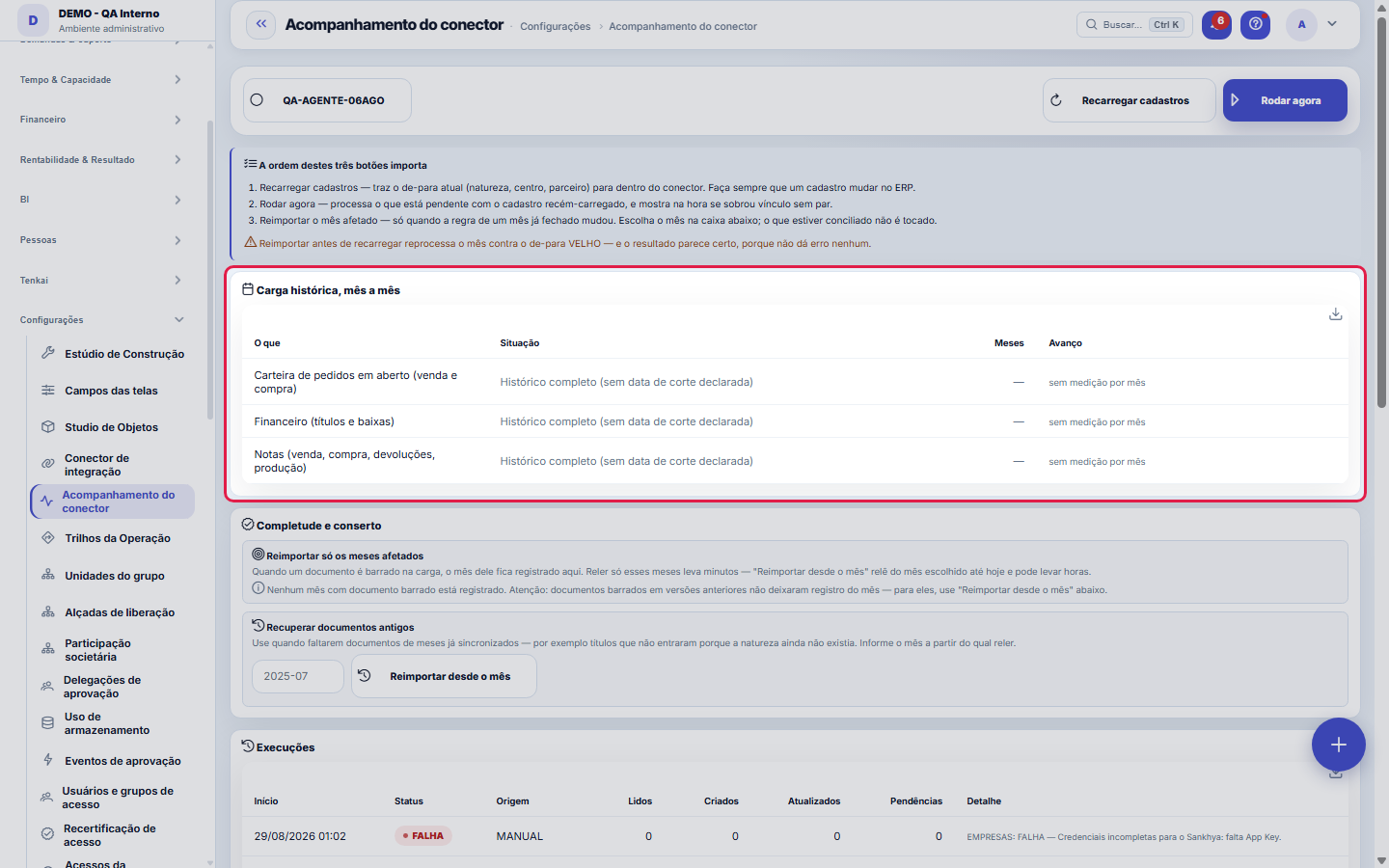
What you find on this screen
A portrait of the screen, read from the screen itself — it changes when the screen changes.
Available actions
Reload recordsRun nowClear pending itemsBind linksRe-import the affected monthsRe-import from monthReprocessCheck against sourceSee which are missingSave policyDry-run (writes nothing)Apply
The list shows
WhatStatusMonthsProgressMonthReasonDocumentsExample in the sourceStartedDurationOriginRead+8
Form fields
InícioComeço da rodada de integração. É por ela que a execução é identificada na fila.
FimTérmino da rodada. Vazio com início antigo é rodada travada, não rodada em andamento.
OrigemSistema de onde os dados foram lidos nesta rodada.
SituaçãoComo a rodada terminou: sucesso, com pendências ou erro.
DetalheO resumo legível do que a rodada leu e do que ficou pendente, recurso por recurso.
Último sinal de vidaÚltimo sinal dado pela rodada. Sem sinal recente, ela está parada e não apenas demorada.
Start here
O que esta tela responde
Did the sync run? Did it match the source? What did not come in, and why? Each run appears with the real numbers — read, created, updated and pending — even when it fails. The reconciliation shows the count AT THE SOURCE next to the count IN TENKA: if they diverge, it turns red, without interpretation.
What this screen answers
When a record arrives without a clear destination (unclassified operation type, unconfirmed company, stock location without a warehouse), it does NOT come in crooked: it becomes a pending item with the reason written out. Fix the cause on the configuration screen and click Reprocess — the connector rereads and what was pending comes in. Nothing is lost, nothing comes in hidden.
How to
A breach reports itself, it does not block
First "Reload master data": master data will be read in full on the next sync (the month-by-month historical load is NOT affected — no progress is lost). Then "Run now", for the master data to come in. Finally "Link references", which connects the documents to the master data that arrived. The order matters: linking before reloading finds nothing, because the master record does not exist yet.
Depois do "Rodar agora", acompanhe pelo indicador — sem recarregar a página
Clicking "Run now" triggers the sync in the background and lights up the "Syncing now…" indicator next to the Runs title. The list updates itself every few seconds while the round runs, and the indicator disappears when it finishes — the final status (OK, PARTIAL or FAILURE) is on the first row of the list, with details per resource.
Rules
Vínculo pendente: o documento entra, o cadastro amarra depois
When a receivable, invoice or order arrives from the ERP citing a customer, supplier, nature or center that has not yet been imported, the document COMES IN — with amount, date and due date preserved — and the missing link is recorded with the ERP code. Nothing is discarded and nothing needs to be typed again. As long as there is a pending link, the panel says in red that the load is NOT complete: the totals by customer, supplier, nature and center are partial until the linking happens.
Amarrar não relê o ERP
Because the ERP code is kept in each pending link, linking is a local operation — seconds, without touching the source. It is the difference between resolving 1,800 pending items in one click and rereading 270 thousand receivables in the ERP for hours. Only the case of a receivable that did NOT come in (nature missing before this version) requires reimporting the month.
A natureza "A CLASSIFICAR" é um problema visível, não uma classificação
If the ERP nature does not exist yet, the receivable comes in under a technical nature called "TO BE CLASSIFIED" — because the alternative would be to refuse the receivable and lose the data. It is NOT a business category: it is a temporary marker. The real nature is kept in the pending link and replaces the technical one when the master record arrives. No report should be read as final while there are receivables in it.
Reprocessar nunca recomeça a carga histórica
The "Reprocess" button on a document pending item (financials, invoices, orders) tries to LINK the reference — it does not erase the progress of the month-by-month load. "Reload master data", on the other hand, resets only the master data cursor. The 92 history windows are only reread if you explicitly request reimporting a month.
Reimportar só os meses afetados
When an ERP document is blocked on import, the system records which month it was from. The "Completeness and repair" panel lists those months, and the reimport button rereads only them — instead of rereading from that month until today. Rereading is safe: existing records are updated by the ERP key and never duplicated. Mind the limit: documents blocked in earlier versions of the system did not leave that month record; to recover them, use "Reimport from month", entering the oldest affected month.
Mensagem vermelha na amarração = falha de execução, não estado dos cadastros
The completeness panel has two types of message, and they call for different actions. The normal messages describe the STATE ("N links waiting for master data", "N should have been linked") and the action is about data: reload master data, decide on a mapping. The RED message starting with "FAILURE linking…" is something else: the pass for that domain blew up and was rolled back — nothing in it was linked, and the text carries the exact technical error. In that case there is no point reloading master data or clicking again: copy the error and send it to support. It is the real reason for a "0 linked".
Exclusão sincronizada: o que acontece com o que a origem apagou
In the reconciliation's "See what is missing" panel, the "left over in Tenka" side lists what exists here and no longer exists at the source. What to do with these leftovers is the connector's policy: KEEP touches nothing (default); DEACTIVATE takes them out of operation and preserves history — this is recommended; DELETE erases physically, but only what no document references — a record cited by a receivable or invoice is deactivated instead of deleted, and the report says how many were held back. Always use Dry run first: it shows the numbers without saving anything. Financial documents do not enter this routine; a reconciled receivable is immutable by rule.
Por que "Amarrar vínculos" podia devolver zero, e o que mudou
On large databases the linking exceeded the database timeout and the whole pass was rolled back — the screen showed "0 linked" with a diagnosis that talked about master data, and the real cause was buried in a log. Now the failure appears in red with the exact error, and the linking itself was rewritten to resolve each link only once and work in batches. If a red message still appears, copy the text: it names the domain and the error.
O que "Amarrar vínculos" faz, em três passos
When a document comes in citing a master record that does not yet exist in the mirror, it COMES IN anyway — with the field empty and the ERP code stored alongside. "Link references" does three things, in this order: writes the link to the document, marks the link as resolved and, finally, closes the pending item that appears in the list. The first two steps are the load; the third is just the stamp.
Aviso amarelo sobre o encerramento das pendências: nada foi perdido
If the message says the links were linked and SAVED but closing the pending items did not fit in the pass, the work is done. What was left behind is the stamp: the rows keep appearing as open until the next round, and no number changed because of it. This is different from the red message, which says the pass was rolled back — that one does mean nothing in that domain was linked.
A ordem dos três botões não é sugestão
Reload master data brings the current mapping from the ERP. Run now processes what is pending against that mapping. Reimport the month only when the rule for a closed month has changed. Reimporting BEFORE reloading reprocesses the month against the OLD mapping — and the result looks right, because it throws no error at all.
Pendência antiga cujo título já entrou fecha sozinha
On each round, the load checks the open pending items against the mirror: a "receivable did not come in" warning whose receivable IS ALREADY on the platform (it came in on a later round or through a reread) is closed automatically, with the stamp saying who closed it and why. What remains in the queue is only what calls for a human decision — a mistyped due date, an invalid e-mail, a master record to check in the ERP.
Why a contact came in without an e-mail
In Tenka the contact's e-mail is the portal access identity, and that is why it cannot be repeated. When the source sends the same e-mail for two different people — the partner in two companies, the accountant for several, the generic reception address — the second contact comes in with name, phone and job title, but without the e-mail, and a pending item warns about it. Nothing is lost: the phone, which is the data someone calls on, is still there. For that contact to access the portal, give them their own e-mail in the source ERP and sync; the pending item closes on the next round.
Frequently asked questions
Monthly cap and automatic cut-off
The statement lists day by day PER BANK ACCOUNT, so a receivable without an account does not appear in it — even though it was imported and is correct in the DRE. If the load came in before the account existed in the mirror, the account code was kept in the document: click "Reload master data", then "Run now" and finally "Link references". There is no need to reimport any month. If the pending links badge does not reach zero, the remaining master records really do not exist at the source.
Filters: the component's and the dashboard's
Not necessarily — and this is the trickiest case on the screen. The same number does not mean the same SET: there have been cases of 38 bank accounts at the source and 38 here, with 24 different codes between the two sides. Use "See what is missing" on the row to see the codes the source has and the mirror does not, and those that only exist here. The list applies to master data (partners, products, accounts, natures, centers, TOPs); for receivables, invoices and orders the right question is the pending links diagnosis, because there are hundreds of thousands of keys.
A lista diz "deveriam ter amarrado". Isso é sempre defeito?
Not always — and this sentence has already pointed at the wrong culprit. It describes the STATE of the database at the moment of reading: document present, field empty, compatible master record. If the previous pass linked and was rolled back for some reason, those same links show up here as if they had never been attempted. Before recording it as a defect, run "Link references" again and see if the number drops: if it drops, it was an interrupted pass; if it stays the same, it is a real defect.
Cadastro que um documento antigo cita — quem pede à origem?
The load itself: every master record cited by a pending link (for example, the nature of an old receivable that came in through the incremental load) is requested BY NAME in the next request to the source, even outside the date window. It is the "whoever the load cited, the load requests" rule — without depending on reimporting entire months.
The pending items for invalid e-mail, partner without a role and account balance are gone. Why?
Because they stopped being anyone's decision (rule of 30/09/2026). Invalid, duplicate or missing e-mail at the source: the record enters without e-mail, full stop — there is nothing to decide here, and fixing it in the ERP is optional. Partner that is neither customer nor supplier in the ERP: whoever has a payable enters as supplier and whoever has a receivable enters as customer, automatically; whoever has neither role nor movement is not mirrored, and neither are their contacts. Balance of a bank account that does not exist in the mirror: it is an inactive account at the source, and its balance is ignored. None of this leaves your radar: the summary of each run, in the Detail column, counts how many entered without e-mail, how many were left without a role and how many balances were ignored. The old pending items of these three kinds were closed as IGNORED in the update.
Was this article helpful?
In the same module: Integrations3
Equity ownershipDeclare how much of each company the group holds and by which method it consolidates. The effect on the resul…Virtual headquartersThe company as a navigable place: the 2D map of the areas (Executive Board, Sales, Finance, People, Operation…Orders sent to the ERPThe queue of what leaves Tenka for the ERP: waiting, accepted with the ERP number, rejected with the ERP reas…
Tenka Academy
Explore the AcademyStep-by-step learning paths for your industry, inside the platform.