

Virtual headquarters
The company as a navigable place: the 2D map of the areas (Executive Board, Sales, Finance, People, Operations, Support, Product, Strategy), who is online right now, the digital employees working at each area's desk with the month's scoreboard and the traffic light that communicates the status with…
The screen
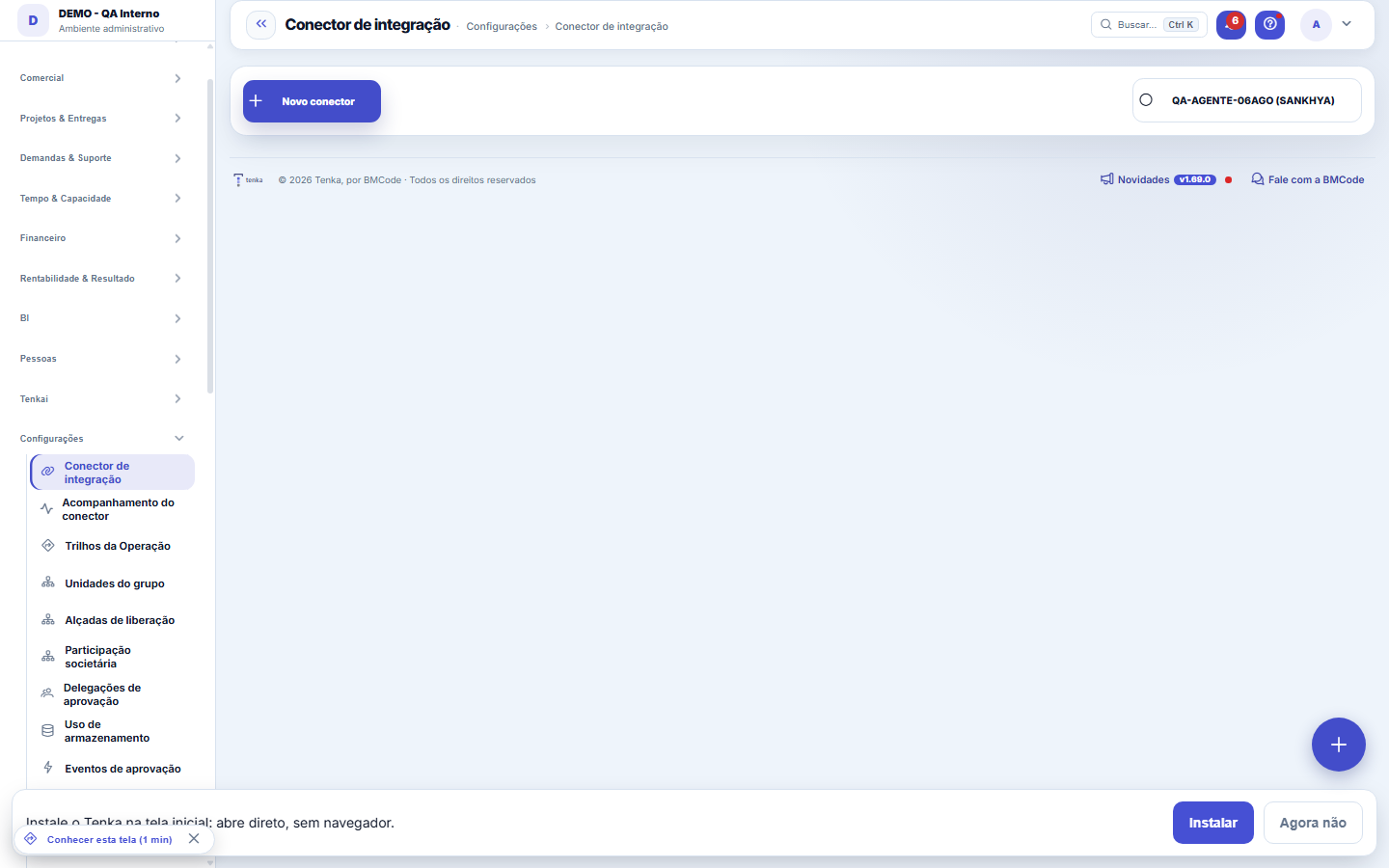
The real screen, in the theme you picked above.
What you find on this screen
A portrait of the screen, read from the screen itself — it changes when the screen changes.
Available actions
New connectorSaveTest connectionRemove own appkeyDiscover companiesCreate all from sourceLinkCreateIgnoreRevertUse the confirmed companiesLook up fields in the ERP+3
The list shows
Code thereName at sourceTax IDHQ thereCompany in TenkaStatusLocation at sourceDescriptionWarehouse in TenkaOp. typeTrack (trilho)
Form fields
NomeComo este conector é chamado. É o nome que aparece no acompanhamento das rodadas.
TipoQual sistema de origem este conector sabe conversar.
AmbienteSe aponta para o ambiente de produção do cliente ou para homologação.
Modo de autenticaçãoForma de autenticar na origem. Muda quais credenciais o conector exige para rodar.
URL baseEndereço do serviço de origem consultado pelo conector.
URL do clienteEndereço do ambiente do cliente, quando a instalação é própria e não em nuvem.
Usuário de serviçoUsuário usado para ler a origem. Bloqueado na origem, todas as rodadas param.
AtivoConector inativo não agenda rodada nova, e o espelho para de receber dado.
Frequência (horas)De quantas em quantas horas a rodada se repete.
RecursosQuais recursos este conector traz: parceiros, produtos, notas.
Escopo de TOPsRecorte de TOPs a trazer. Vazio traz tudo, e é aí que a carga fica grande demais para ativar.
Escopo de empresasCódigos de empresa na origem que devem ser trazidos. Vazio traz todas.
Data de corteA partir de que data o histórico é trazido. Antes dela o conector ignora o movimento.
Último sincronismoÚltima vez que este conector sincronizou com sucesso.
Start here
O que esta tela responde
Your ERP keeps running the operation — and Tenka sees everything? Here you connect the bridge: enter the credential (which is stored encrypted), confirm which companies there correspond to which companies here, choose what to sync and classify the operation types. After that, the connector runs on its own on schedule.
What this screen answers
The source system tags each invoice with an "operation type" — and not everything that looks like a sale IS a sale: transfers between branches, shipments for processing and giveaways issue exactly the same invoice. You say what each type means: sale, return, purchase, production or ignore. An unclassified type does NOT come in — the invoice stays pending, in plain sight, until you decide. That is what keeps a transfer from becoming fake revenue on your dashboard.
Rules
O Tenka lê e analisa; quem age é o ERP de origem
With the connector, mirrored receivables do NOT enter Tenka's collection schedule (your ERP already collects — collecting twice is the worst possible mistake), mirrored invoices do not generate billing and mirrored documents do not move local stock (the balance comes from there, with the average cost from there). If one day the operation migrates to Tenka, this changes by your decision — never by accident.
Empresa nunca nasce da sincronização
The connector DISCOVERS the companies in your ERP and lists them for you to confirm one by one — link to an existing company, create from the data there, or ignore. A record coming from an unconfirmed company stays pending; nothing is dumped into the head office by default.
Writing to the ERP: the Tenka order goes to the ERP
Turn on "Turn on writing orders to the ERP" and enter the order TOP (the staging one first), the default negotiation type and the stock location. From then on the confirmed order enters the queue (Integrations ▸ Orders sent to the ERP), is rechecked in the ERP (stock and credit) and created by the Include Movements service. The order status field (optional) is the custom TGFCAB field that says picking, shipped, delivered; the program view is the view the integrator creates with each customer’s points/cashback balance. Without a TOP, writing does not turn on.
Where the purchase charge is created
The parameter Portal: payment method for online purchases decides where the charge is created. In AUTO (default), with ERP writing on, ERP applies: the order goes to the ERP, the bill is created there and reaches Tenka through the finance read — so local invoicing of an order already written to the ERP does not create a receivable (it would charge twice). Without writing, ASAAS applies. ERP, ASAAS and BOTH can also be chosen by hand in Settings ▸ Parameters.
The test ERP (stub)
The "test ERP" type exists for demos and testing: it talks to no ERP, returns predictable made-up numbers and statuses and issues bills with a fictitious bank. The Sankhya server and credential fields do not apply to it — the "server address missing" notice can be ignored for this type. In production, use the real ERP type with the homologation TOP first.
Frequently asked questions
O conector vai alterar dados no meu ERP?
Não: o Tenka LÊ o ERP e espelha os dados — o ERP continua dono da operação. O que o Tenka entrega é a leitura (painéis, margem, cobrança, Tenkai). O passo mais importante é a classificação (passo 5): é ela que diz o que cada dado do ERP significa aqui.
Was this article helpful?
In the same module: Integrations3
Actuarial balance sheetTHE ACTUARIAL LAYER'S BALANCE SHEET — forecast × actual, no makeup. It confronts what the actuarial core's mo…Equity ownershipDeclare how much of each company the group holds and by which method it consolidates. The effect on the resul…Orders sent to the ERPThe queue of what leaves Tenka for the ERP: waiting, accepted with the ERP number, rejected with the ERP reas…
Tenka Academy
Explore the AcademyStep-by-step learning paths for your industry, inside the platform.