

Tenka Board
The monthly business decision ritual, with minutes. The agenda arrives ready-made — business health, the goals traffic light, the month's result (for those who can see values), and the open FCAs of highest severity. The board records the decisions and closes the minutes, which become immutable from…
The screen
The real screen, in the theme you picked above.
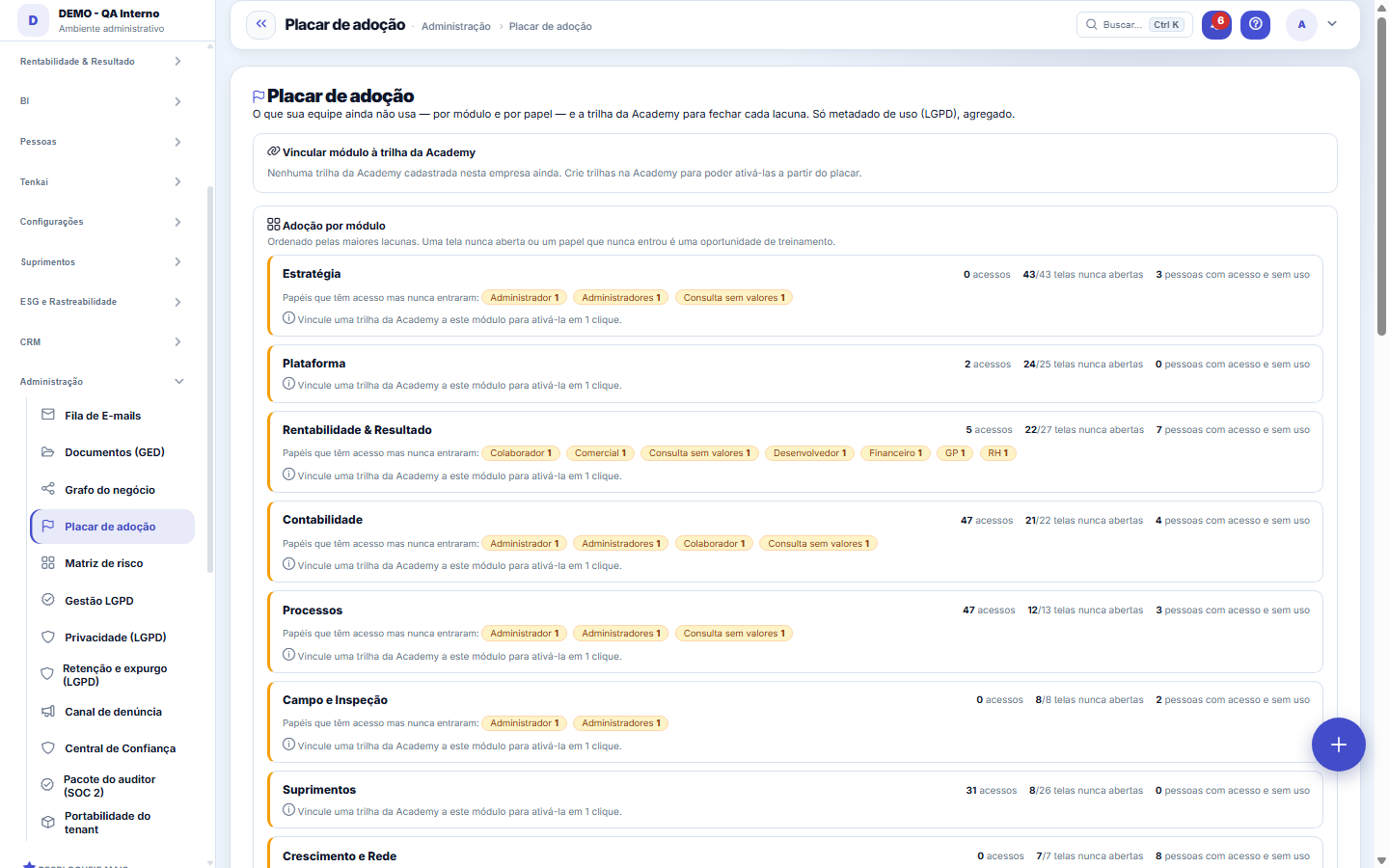
What you find on this screen
A portrait of the screen, read from the screen itself — it changes when the screen changes.
Available actions
LinkNoYes
Form fields
MóduloO módulo medido nesta linha do placar de adoção.
AcessosQuantas vezes as telas do módulo foram abertas.
TelasQuantas telas o módulo tem disponíveis.
Telas nunca abertasTelas que ninguém abriu. É o que a empresa paga e não usa.
Trilha vinculadaTrilha da academia que ensina este módulo. Sem trilha, adoção baixa não tem remédio pronto.
Tem trilhaSe existe caminho de aprendizado ligado ao módulo.
Start here
O que esta tela responde
What your team does NOT use yet — by module and by role. It is not a ranking of people: it is the map of what was contracted and is sitting idle.
What this screen is
Your team's adoption scoreboard: by module, how much is being used and, above all, what is NOT — including by role (who has the access profile but never opened that module's screens). For each gap, a button activates the corresponding Academy track for the right people, in one click. Usage metadata only (LGPD), aggregated.
How to
Complementa a adoção da equipe, não substitui
This screen looks by MODULE (what in the platform is idle). The team adoption screen looks by PERSON (who logged in, who did not come back). Together they answer "what" and "who".
Rules
What this screen answers
Most of the time it is a permission nobody granted, or nobody knowing it exists. That is why each gap has the Academy track one click away: the shortest path between seeing the hole and closing it.
Frequently asked questions
Which question this screen answers
"What does my team still not use — and whom should I train?" The scoreboard shows, by module, the accesses, how many screens have never been opened and how many people have the access profile but never logged in (the chips list those roles). To close the gap without leaving the screen, link an Academy track to the module and use the "Activate track" button, which enrolls the track's target audience in one click.
Was this article helpful?
In the same module: Where work gets stuck14
Process AS-ISHow the process works TODAY, in three layers: the record of what it receives and delivers, the map of who doe…Agile CoachAn assessment of the team, made only with numbers the team has already recorded — with the calculation trail …Value ChainThe org chart shows WHO reports to whom. The value chain shows HOW work flows through the company until it be…Customer 360The single view of the customer: contracts, finance, support, visits, and conversations in one place. It's co…Service orderThe record of the field service: customer, scope, parts, hours, and signature. A closed service order is the …MCP ServerExposes Tenka's tools to external AI agents via the MCP protocol. What an external agent can do is exactly wh…Context mapYour company is an open system: it takes in people, resources and demands, and gives back deliveries, results…Operação assistidaA IA acompanha a operação em tempo real e sinaliza o que exige ação. Ela SUGERE; a execução com efeito — muda…
Tenka Academy
Explore the AcademyStep-by-step learning paths for your industry, inside the platform.