

Time clock
Record the day's clock-in/clock-out from your phone.
The screen
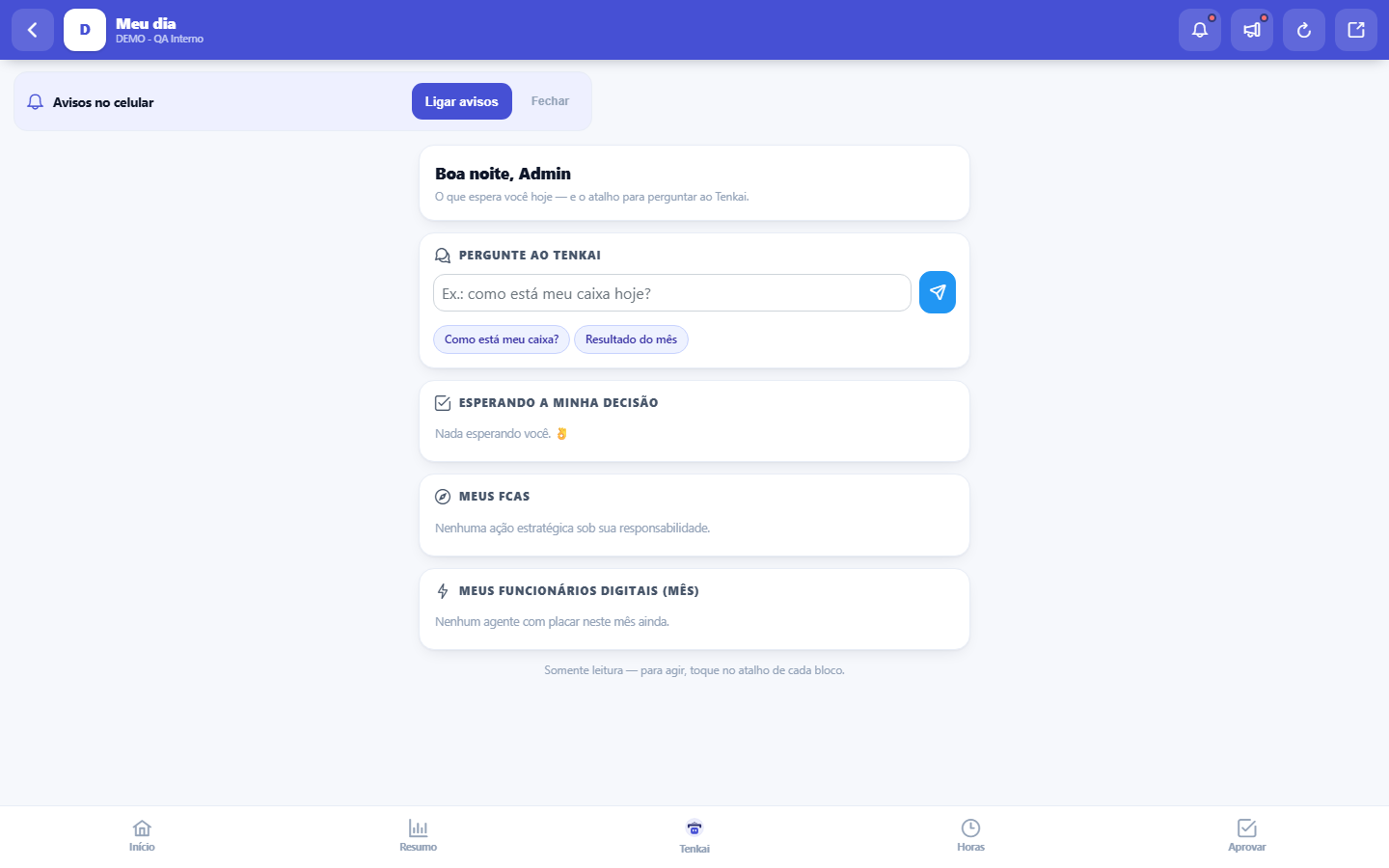
The real screen, in the theme you picked above.
What you find on this screen
A portrait of the screen, read from the screen itself — it changes when the screen changes.
Form fields
Esperando a minha decisãoQuantas solicitações estão paradas na sua alçada agora.
Valor da solicitaçãoValor financeiro de cada solicitação que aguarda a sua decisão.
Meus FCAsQuantas ações estratégicas estão sob a sua responsabilidade.
Prazo do FCAData limite acordada para concluir a ação estratégica.
Ações dos agentesQuantas ações os seus agentes digitais realizaram no mês corrente.
Execuções dos agentesQuantas vezes os seus agentes digitais rodaram no mês corrente.
Erros dos agentesQuantas execuções dos seus agentes digitais falharam no mês corrente.
Valor recuperado no mêsDinheiro que os seus agentes digitais recuperaram ou evitaram perder no mês.
Start here
O que esta tela responde
What awaits YOU today: what needs your approval, the strategic actions under your responsibility and what the digital agents produced in the month. It is the first screen for those who open the system on their phone.
Para que esta tela existe
The phone screen that brings your day together: what awaits your decision (approvals), your FCAs (strategic actions under your responsibility), the result of your digital employees in the month and a field to ask Tenkai (opens the existing chat). Read-only — to act, each block has its shortcut. — this is the role of the "My day (mobile)" screen within the platform.
Daily queue on the phone
The Daily queue block shows how many items only you can resolve, how many are late and the first five in the queue, in the same order as the computer screen. Tap Open to go to the item, or the queue button to see all of them and act in one click.
How to
Perguntar à Tenkai
The Tenkai shortcut opens the chat already with your company's context. It is the fastest path to "why did this number change?" without having to find the source screen.
O placar dos funcionários digitais, número a número
The agents block shows the current month in three numbers: actions (what the agents decided to do), executions (how many rounds they completed) and errors (what failed and deserves a look). When there is value recovered in the month, it appears highlighted — but only for those with the "See Values" permission; without it, the operational scoreboard remains visible and the money stays hidden. The same applies to the value of approvals in the first block. Errors above normal are the signal to open the agent catalog in the full version.
Rules
Aqui você lê; agir é um toque adiante
The screen is read-only, on purpose — it exists for you to decide WHERE to go, not to approve in a hurry in the coffee line. Each block has the shortcut that takes you to the screen where the action actually happens, with the full context in view.
Was this article helpful?
Tenka Academy
Explore the AcademyStep-by-step learning paths for your industry, inside the platform.